Jeep Grand Cherokee Wireless Charging: Availability, Compatibility & How to Use

Does the Jeep Grand Cherokee Have Wireless Charging?
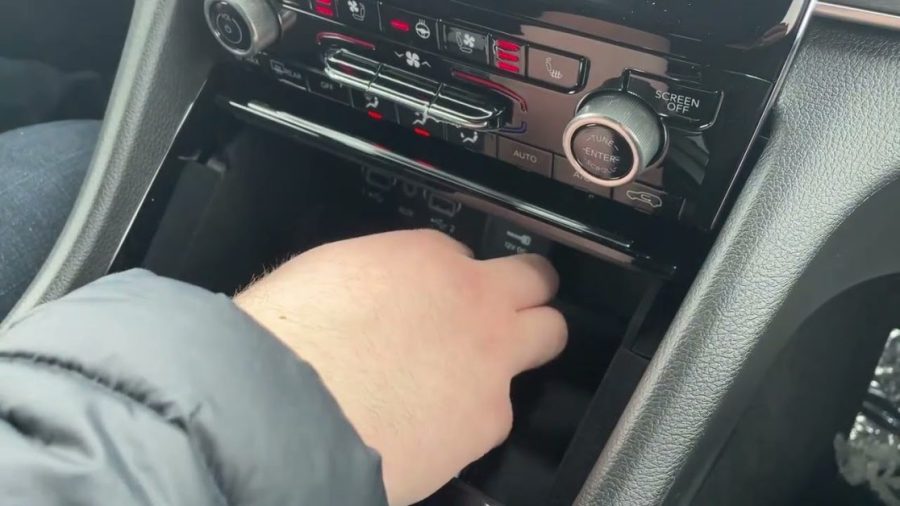
Yes, the Jeep Grand Cherokee can come equipped with wireless charging, but it’s typically offered as an optional feature rather than standard equipment across all trim levels. The availability depends on your specific model year and trim package.
It’s important to note that while wireless charging is confirmed for the regular Jeep Cherokee models, the Grand Cherokee’s wireless charging availability varies by configuration. For 2026 and newer models, Jeep has expanded wireless charging options across more vehicles in its lineup, including select Grand Cherokee trims.
The wireless charging pad, when equipped, is integrated into the center console area and supports the universal Qi charging standard. If you’re shopping for a new Grand Cherokee or checking your current vehicle’s features, verify wireless charging availability with your dealer or check your vehicle’s option list, as this feature may be part of specific technology or convenience packages.
How Wireless Charging Works in Your Jeep
The Jeep Grand Cherokee’s wireless charging system operates on the 15-watt Qi standard, providing efficient charging for compatible devices. The charging pad is typically located in the center console, designed as a recessed area where you can safely place your smartphone.
To activate wireless charging, your vehicle must be running (engine on) with doors closed. Simply place your Qi-compatible device face-up on the designated charging area. The system will automatically detect your phone and begin charging – no cables or adapters required.
LED indicators provide visual feedback on charging status. A blue light typically indicates active charging, while different colored lights may signal various states like device detection or charging completion. The charging pad can accommodate most standard-sized smartphones, though larger “phablet” devices may not fit properly.
For optimal performance, ensure your device is properly aligned with the charging coils. The system works through most phone cases, though very thick cases or those with metal components may interfere with charging efficiency.
Device Compatibility & Limitations
The Grand Cherokee’s wireless charging pad supports any device that meets the Qi wireless charging standard, making it compatible with a wide range of smartphones. This includes iPhone 8 and newer models, most Samsung Galaxy devices, Google Pixel phones, and many other modern smartphones.
However, there are some important limitations to consider. Large “phablet-sized” phones, such as the iPhone 8 Plus or Samsung Galaxy S8 Plus, may not fit properly within the charging pad’s dimensions. The recessed design has specific size constraints that accommodate standard smartphone dimensions but may be too small for oversized devices.
Phone cases can affect charging performance. Thin cases typically don’t interfere with charging, but thick cases, wallet cases, or those with metal components, magnets, or credit cards should be removed before charging. If your phone seems to charge slowly or inconsistently, try removing the case to see if performance improves.
For the most reliable charging experience, refer to the Apple wireless charging compatibility guide for iPhone users or your Android device manufacturer’s specifications to confirm Qi compatibility.
Safety Tips & Best Practices
Wireless charging in your Jeep Grand Cherokee is generally safe, but following proper guidelines ensures optimal performance and prevents potential issues. The most critical safety rule involves keeping your key fob at least 6 inches (15 cm) away from the charging pad. Proximity between the key fob and the charging pad can potentially damage the fob’s electronics.
Remove all metallic objects, coins, or cards from the charging area before placing your phone. These items can interfere with the charging process and may become hot during operation. Similarly, ensure no foreign objects are stuck to the back of your phone or case.
Monitor your phone for overheating during charging, especially in hot weather or direct sunlight. If your device becomes uncomfortably warm, remove it from the charging pad and allow it to cool. Some phones may temporarily reduce charging speed or pause charging if they detect excessive heat.
While charging, some phones may experience reduced performance in certain apps or functions. This is normal behavior as the device manages power distribution between charging and active use. For critical navigation or communication needs, consider using a traditional charging cable for more consistent performance.
Troubleshooting Common Issues
If your phone isn’t charging wirelessly, start with these basic checks. Ensure your vehicle is running and doors are closed – the charging system typically doesn’t operate when the vehicle is off. Verify your phone is properly centered on the pad and check for any debris or objects in the charging area.
When charging seems slow or intermittent, remove your phone case and try again. Thick cases or those with metal components can significantly impact charging efficiency. Also, ensure your phone’s software is up to date, as older software versions may have compatibility issues with wireless charging systems.
If the charging pad doesn’t seem to activate at all, check that no metallic objects are present in or around the charging area. Clean the charging surface with a soft, dry cloth to remove any dust or residue that might interfere with proper operation.
For persistent issues, consult your Jeep official owner resources or contact your dealer’s service department. In some cases, software updates for the vehicle’s infotainment system may resolve charging compatibility problems.
The wireless charging feature in the Jeep Grand Cherokee offers convenient, cable-free charging for compatible devices. While availability varies by trim level and model year, when equipped, it provides a seamless way to keep your smartphone powered during drives. Understanding proper usage, compatibility requirements, and safety guidelines ensures you get the most from this modern convenience feature.