How to Change Speedometer Display on Jeep Grand Cherokee?

Your Jeep Grand Cherokee’s instrument cluster offers multiple display modes to suit your driving preferences, but figuring out how to switch between them often confuses new owners. Whether you want a traditional analog speedometer, a full-screen digital readout, or a hybrid view combining both, the steering wheel controls make customization straightforward once you know the process. This guide walks you through each method for different model years, ensuring you find and set your preferred speedometer view.
Understanding Your Speedometer Display Options
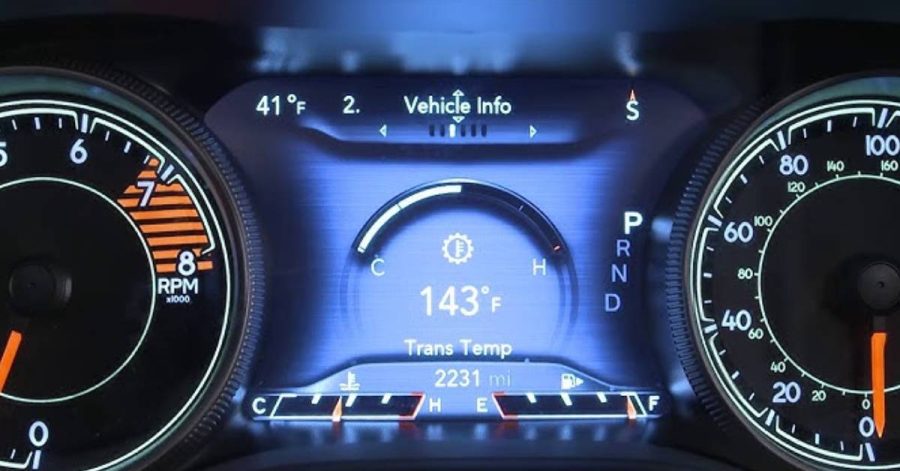
The Jeep Grand Cherokee provides distinct visual modes for your speedometer rather than permanently locking you into one configuration. The analog theme displays a traditional gauge cluster with a physical-looking speedometer needle on the left and a tachometer on the right, mimicking classic dashboard layouts. The digital theme replaces those gauges with a full-screen digital readout, showing your speed in large, easy-to-read numbers positioned centrally or in alternative layouts depending on what information you’re also displaying.
Between these extremes exists a hybrid view, which keeps the analog gauges while also showing digital speed information—useful if you want maximum screen real estate without sacrificing the familiar gauge appearance. Each model year from 2011 through 2025 uses similar control schemes but with slight variations in menu structure and display options.
Changing the Speedometer Display on 2011–2021 Grand Cherokee (WK2)
If you own a 2011 through 2021 Grand Cherokee WK2 model, your instrument cluster uses steering wheel-mounted controls to manage display modes. Here’s the precise method:
Step 1: Locate the Steering Wheel Controls
Look at the left side of your steering wheel. You’ll find four directional arrow buttons (up, down, left, right) and a center “OK” button. Your entire instrument cluster display is controlled through this interface—no touchscreen required for basic display switching.
Step 2: Press the Up Arrow to Access the Speedometer Menu
Press the up arrow button repeatedly until the speedometer option appears highlighted on your instrument cluster. You’ll see a small icon resembling a speedometer or the word “Speedometer” in the menu tiles. The first press typically shows your current view; subsequent presses scroll through available options if multiple displays exist.
Step 3: Press OK to Toggle Between Display Modes
Once the speedometer menu is selected, press the center OK button. A single press cycles through the available modes—usually alternating between analog and digital presentations. Watch your cluster change in real time as you cycle through options. If you see a small dot indicator beneath the speedometer tile, it means multiple screens exist for this menu item.
Step 4: Use the Right Arrow to Explore Variant Options
If a dot appeared below the speedometer tile after your OK press, press the right arrow button to reveal alternate layouts of the same mode. Some versions show digital speed in the center with smaller gauges flanking both sides; others position digital numbers across the full screen width. Test each variant to find your preference.
Step 5: Return to Your Preferred View
Once satisfied, simply stop pressing buttons. Your selection remains active until you manually change it again—no saving required. The display preference persists even after turning off and restarting your vehicle.
Changing the Speedometer Display on 2021–2025 Grand Cherokee (WL)
The latest generation Grand Cherokee WL models retained the same steering wheel button interface but reorganized the menu structure slightly. If you own a 2021 or newer model, follow these adjusted steps:
Step 1: Confirm Your Engine is Running
For WL models, ensure the engine is running or the vehicle is in the ON position. Unlike some WK2 configurations, certain display changes require the ignition to be on.
Step 2: Access Settings via the Left Steering Wheel Pad
Press up on the left directional pad (steering wheel) until you reach the Settings icon. You may need to scroll through 3–4 menu items first (your first screen typically shows Speedometer/Vehicle Info). The Settings tile usually displays a gear icon or the word “Settings.”
Step 3: Navigate to Display Settings
Press OK on the Settings tile. This opens the Settings submenu. Scroll down using the down arrow until you locate “Display” or “Screen Setup” options. Grand Cherokee L models (the longer WL variant) may label this as “Screen Setup.”
Step 4: Select Speedometer Theme Preferences
Once inside Display Settings, look for options like “Gauge Theme,” “Display Mode,” or “Speedometer Style.” Press OK to enter this submenu.
Step 5: Cycle Through Analog, Digital, and Hybrid Options
Use the right arrow button to scroll through available speedometer appearances. Most WL models offer:
- Analog Theme: Traditional gauges fill your cluster edges with a speedometer on the right
- Digital Theme: Full-screen digital speed display (very large numbers)
- Hybrid Options: Combination layouts with analog gauges and digital info panels
Step 6: Confirm Your Selection
Press OK to set your chosen display. The change applies immediately, and the system automatically returns to your main menu. Your preference saves automatically.
Switching Between MPH and KPH Displays
Both WK2 and WL models allow switching between miles per hour and kilometers per hour independently of the analog/digital choice. This proves especially useful for international travel or when your speedometer is set to the wrong unit.
For All Models:
- Navigate to your current Speedometer display view
- Press and hold the OK button for approximately 2 seconds
- Your speed units toggle from MPH to KPH (or reverse)
Some owners report the unit changing on a single OK press rather than a held press—test both methods if one doesn’t work. The setting persists across restarts.
Customizing Your Instrument Cluster Display Corners
Beyond the main speedometer mode, your Grand Cherokee allows extensive customization of the information displayed in your cluster’s upper corners and center area. This extends your speedometer customization possibilities considerably.
Accessing Customization Options:
- Navigate to Settings or Screen Setup in your instrument cluster menu
- Look for “Customize Display” or “Corner Settings”
- Select “Upper Left,” “Upper Right,” or “Center” as desired
- Press the right arrow to cycle through available data: Outside Temperature, Time, Compass, Trip A, Trip B, Range, Average MPG, Current MPG, Gear Display, or Nothing (blank)
Displaying Current MPG alongside your digital speedometer, for example, creates a highly informative dashboard without requiring a separate screen. This micro-customization helps optimize your preferred speedometer setup.
Solving Common Speedometer Display Problems
Problem: Display Reverted to Previous Setting After Restart
This typically indicates you didn’t fully confirm your selection. Return to your speedometer menu and ensure you pressed OK with your chosen mode highlighted. Some models require a second confirmation press.
Problem: Digital Speedometer Shows Impossible Values
If your digital speed displays strange numbers unrelated to your actual velocity, toggle from KPH to MPH and back. The system occasionally displays residual data from previous settings until you force a unit refresh.
Problem: Can’t Find Speedometer Menu in Settings
On newer WL models, try scrolling backwards (pressing the down arrow) from your current position. The Speedometer menu sometimes appears above the Settings tile, depending on how it’s organized on your specific trim level.
Problem: One Display Mode Appears Greyed Out
Some trim levels or model years don’t offer all options. If a display theme appears unavailable, your vehicle’s specific equipment package likely doesn’t support it—this is normal and not a malfunction.
Tips for Optimizing Your Speedometer View
For Highway Driving: Many drivers prefer the analog theme on extended trips, as the peripheral gauge position keeps speed awareness in your natural sight line without requiring center-screen focus.
For City Navigation: Digital themes often work better during congested driving where quick, glance-free speed confirmation matters. The center display placement catches your eye faster than side gauges.
For Off-Road Adventures: If your Grand Cherokee has Selec-Terrain or off-road pages equipped, consider leaving your speedometer in analog mode—digital displays sometimes reposition or resize when you access terrain-specific overlays, creating visual inconsistency.
For Nighttime Driving: Test both modes in darkness. Some models’ digital displays produce less glare than analog gauge backlighting, while others do the opposite, depending on your brightness settings. Your preference may differ between day and night.
Frequently Asked Questions
Can I make the digital speedometer text larger?
Not directly—size is fixed for your chosen display mode. However, positioning digital speed centrally (rather than in a corner) makes it more prominent. Additionally, ensuring your cluster brightness is set to manual rather than auto can prevent unfortunate dimming at critical moments.
Does changing the display mode affect fuel economy readings?
No. Display modes are purely visual. Your actual fuel economy calculation remains unchanged regardless of how you view speed information. Your MPG data is independent of speedometer styling.
Will my chosen display mode persist if I switch drivers?
Yes, your selection remains active regardless of who drives. If another driver prefers a different mode, they’ll need to manually change it using the same steering wheel controls.
Can I set different display modes based on driving conditions automatically?
Most Grand Cherokee models don’t offer automatic theme switching based on conditions. Some newer WL models with advanced customization might provide this through specific settings—check your owner’s manual for “Favorites” or conditional display options.
Why does my dealership recommend keeping the analog theme?
This often reflects personal preference among service advisors rather than a technical necessity. Both modes work identically for actual vehicle operation. Choose whichever you find more intuitive
Final Recommendations
Your speedometer display choice significantly impacts your daily driving experience, making this customization worth the few minutes required for adjustment. Most drivers settle into their preferred mode within the first week and rarely change it again, so experiment freely—your choice is never permanent.
Start by trying the digital theme if you primarily drive in controlled environments where you can safely focus on the center cluster. Try the analog theme for highway and off-road driving, where peripheral awareness matters. Use the hybrid options as compromise solutions if you want both styles visible simultaneously.
Remember that display customization extends far beyond speedometer mode—the accompanying information corners and center area can be configured independently, allowing you to build a cluster display perfectly aligned with your driving style. Revisit these settings seasonally or when your routine changes significantly, and you’ll optimize your Jeep’s usability year-round.