How to Add CarPlay to Your 2017 Jeep Grand Cherokee (Complete Guide)

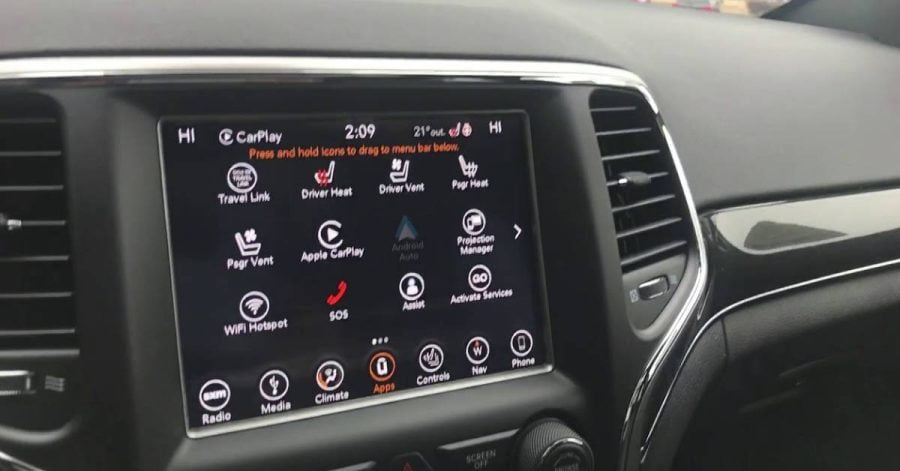
Adding Apple CarPlay to your 2017 Jeep Grand Cherokee transforms your factory Uconnect system into a modern infotainment hub with navigation, music streaming, and hands-free calling. Unlike newer models, the 2017 Grand Cherokee lacks native CarPlay support, but plug-and-play retrofit modules and head unit swaps make installation straightforward.
Why Upgrade Your 2017 Grand Cherokee to CarPlay
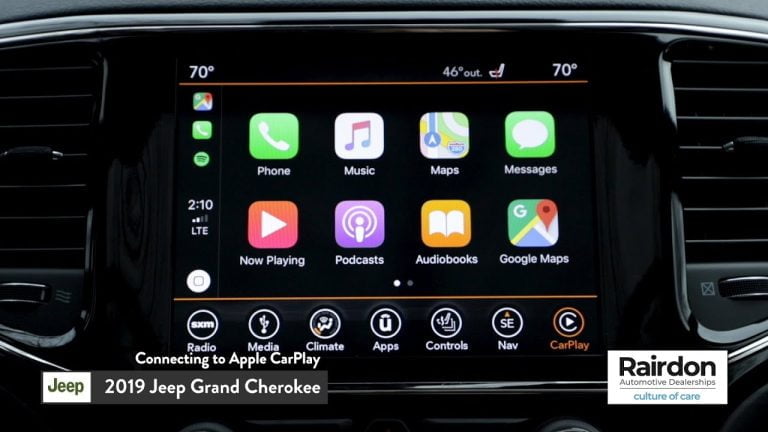
CarPlay integration brings smartphone connectivity to your 8.4-inch Uconnect screen without replacing the entire head unit. You gain instant access to Siri, Apple Maps, Spotify, and messaging while retaining steering wheel controls and backup camera functionality. Most modules install in under 90 minutes without permanent modifications.
The factory Uconnect system in 2017 models feels dated compared to CarPlay’s intuitive interface. Voice commands work reliably, navigation updates automatically, and music libraries sync seamlessly. However, some aftermarket modules require toggling between OEM mode and CarPlay mode using a dashboard switch, adding minor complexity.
Budget considerations matter—retrofit kits range from mid-tier to premium pricing, while full head unit replacements cost significantly more and may require VIN programming at dealerships.
Methods to Add CarPlay (Modules vs. Head Unit Swap)
Wireless Modules
Wireless CarPlay modules plug directly into your Uconnect system’s LVDS connector behind the dash. Products like Winston Instruments and Carlinklife VL2 preserve factory aesthetics while adding wireless smartphone pairing. These kits include a USB hub for charging, a microphone for Siri, and a physical button to switch between Uconnect and CarPlay screens.
Installation involves removing trim panels, connecting power and video cables, and mounting the switch near the gear shifter. Wireless versions eliminate cable clutter but may experience occasional Bluetooth dropouts during long drives. Wired modules offer stabler connections for drivers prioritizing reliability over convenience.
Full Head Unit Swaps
Swapping your 2017 radio for a 2018+ Uconnect 4C head unit with native CarPlay support delivers OEM-level integration. This method requires purchasing a compatible radio (UAQ model with 8.4-inch display), VIN programming at a Jeep dealer, and potentially updating steering wheel wiring harnesses.
While swaps provide the cleanest installation, costs escalate quickly—expect professional labor fees if you lack coding tools. Third-party aftermarket head units from Pioneer or Alpine offer cheaper alternatives but sacrifice steering wheel button compatibility and backup camera retention unless adapters are purchased separately.
For links to related Jeep upgrades, check out the best Jeep Wrangler radio upgrade and Android Auto 2017 Jeep Grand Cherokee guides.
Top Recommended CarPlay Modules & Kits

credit: winstoninstruments.com
Winston Instruments CarPlay Module
The Winston Instruments kit supports 2014-2017 Grand Cherokees with 8.4-inch Uconnect screens. Key features include wireless CarPlay/Android Auto, retention of factory cameras and steering controls, and plug-and-play installation. Users report 90% satisfaction on Reddit forums, praising its stable connection and minimal lag during navigation.
Pricing falls in the premium tier, reflecting higher build quality and customer support. The included switch mounts cleanly near the USB ports, blending with the OEM design.

credit: Facebook.com
Carlinklife VLine VL2
Carlinklife’s VL2 module adds wireless connectivity and supports YouTube playback alongside CarPlay. Installation requires splicing into the factory USB hub and connecting an LVDS adapter. Some owners note the learning curve for switching modes, but once configured, the system operates smoothly.
This mid-range option suits DIY installers comfortable with basic wiring. Firmware updates via USB improve performance over time, addressing early bugs reported in 2024 reviews.

credit: www.justforjeeps.com
Infotainment.com UAQ Upgrade Kit
Infotainment.com sells factory Uconnect 4 UAQ radios pre-programmed for CarPlay. These OEM units eliminate aftermarket quirks but require professional installation and VIN matching. Pricing sits at the upper end due to dealer-grade components.
For drivers seeking flawless integration with existing controls, this represents the most reliable—though expensive—path forward.
Step-by-Step Installation Guide
Tools Needed
You’ll need a plastic trim removal tool set, a 7mm socket wrench, electrical tape, zip ties, and a multimeter for testing connections. Disconnect the negative battery terminal before starting to prevent electrical shorts.
Wiring the Module
- Remove the center console trim by gently prying around the 8.4-inch screen’s edges. Release the clips securing the Uconnect unit and slide it forward to access the rear connectors.
- Locate the LVDS video cable (gray 40-pin connector) and unplug it. Attach the module’s LVDS adapter inline between the factory connector and head unit.
- Connect the red power wire to a 12V ignition source (ACC fuse tap recommended) and the black ground wire to the chassis metal. Route the USB extension cable through the dash to a convenient charging location.
- Mount the toggle switch near the gear shifter or in an empty button slot. Connect the switch’s wiring harness to the module’s input port.
- Plug the included microphone into the module and position it near the driver’s sun visor for optimal Siri recognition.
Testing and Calibration
Reconnect the battery and start the vehicle. Press the toggle switch to activate CarPlay mode—your iPhone should pair automatically via Bluetooth. Test steering wheel controls, backup camera functionality, and audio output through factory speakers.
If touch controls fail, verify the LVDS connection is seated firmly. Bluetooth pairing issues often resolve by forgetting the vehicle in iPhone settings and re-pairing fresh.
For troubleshooting similar systems, see how to connect Apple CarPlay in Jeep Grand Cherokee.
Troubleshooting & Maintenance
Common Errors
No Touch Control: Some modules rely on Bluetooth for touch input rather than direct screen integration. Ensure your iPhone’s Bluetooth remains enabled and paired during use.
Audio Dropouts: Wireless modules occasionally lose connection when multiple Bluetooth devices compete for bandwidth. Disable unused devices in your phone’s settings or switch to wired mode using a Lightning cable.
Switch Not Responding: Toggle switches wear out after thousands of presses. Test continuity with a multimeter and replace faulty switches through the module manufacturer.
Firmware Updates
Manufacturers release firmware patches addressing connectivity bugs and adding features. Download updates from vendor websites onto a USB drive, then follow on-screen prompts after inserting the drive into the module’s USB port.
Keep installation manuals and warranty cards accessible—some brands void coverage if third-party installers perform updates incorrectly.
Costs & Where to Buy
Retrofit modules range from mid-range pricing (entry-level wired kits) to premium tiers (wireless units with advanced features). Factory Uconnect 4 head units occupy the highest price bracket, especially when factoring in dealer programming fees.
Purchase from authorized retailers like Infotainment.com, Winstoninstruments.com, or Carlinklife.com to ensure warranty coverage. Verify VIN compatibility before ordering—2017 Laredo and Limited trims use identical Uconnect hardware, but Overland models may require adapter cables.
Used modules appear on forums and eBay but lack warranties and risk compatibility mismatches. Stick with new inventory for peace of mind.
Alternatives if Modules Don’t Fit
If your Grand Cherokee lacks the 8.4-inch Uconnect screen or you prefer non-invasive solutions, portable CarPlay displays mount to dashboards via suction cups. These standalone units connect wirelessly to iPhones and provide 7-9 inch touchscreens independent of factory radios.
Phone mounts with magnetic holders offer basic smartphone integration without CarPlay features. While less elegant, they avoid modification risks and cost under $30.
For off-road enthusiasts prioritizing simplicity, consider best phone holder for Mini Cooper-style universal mounts that adapt to Jeep interiors.