How to Check Miles to Empty on a Jeep Grand Cherokee?

Monitoring fuel range helps you plan refueling stops and prevents unexpected empty-tank situations. The Jeep Grand Cherokee offers multiple methods to check miles to empty, depending on your model year and dashboard configuration. This guide covers all generations and display types so you can quickly locate fuel range information on your specific vehicle.
Understanding the Miles to Empty Feature
Miles to empty calculates the estimated driving distance based on the current fuel level and recent fuel consumption patterns. The system analyzes speed, road conditions, driving habits, and fuel usage from the last 30 gallons consumed. This dynamic calculation adjusts in real-time as driving behavior changes. Aggressive acceleration, heavy traffic, or steep inclines reduce the estimate, while smooth highway driving typically extends it.
The feature provides a practical advantage over traditional fuel gauges by converting abstract tank levels into actionable distance data. Instead of guessing how far a quarter-tank will stretch, drivers receive a specific mileage estimate.
Modern Jeep Grand Cherokee Models (2010–Present)
Locating the Display
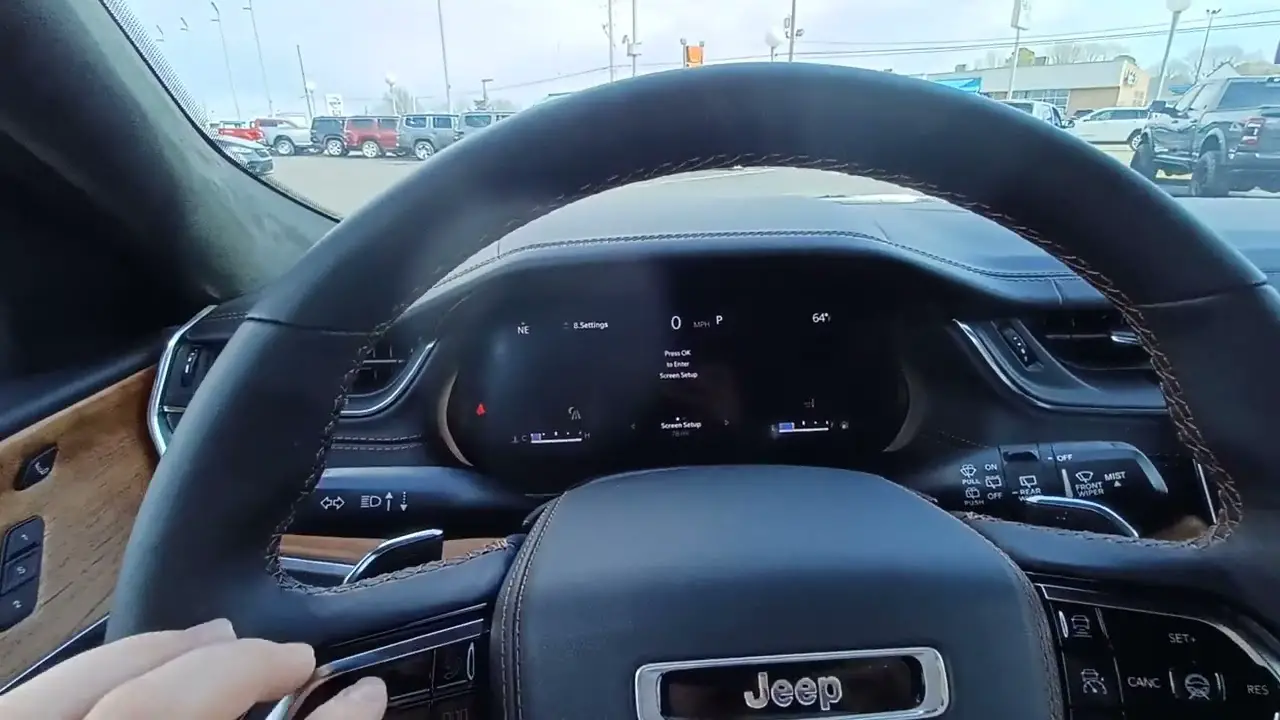
Miles to empty appears in the instrument cluster display between the speedometer and tachometer. Most Grand Cherokee models from 2010 onward feature a digital multifunction display integrated into the gauge cluster. Some configurations show range data in the upper left or upper right corner of the display by default.
Using Steering Wheel Controls
The left side of the steering wheel contains a control panel with arrow buttons and an OK button. Press the up or down arrow to scroll through menu options. Navigate to the fuel economy section where miles to empty appears alongside current fuel consumption and average fuel economy data.
Press the right arrow to access submenus and detailed trip information. The left arrow returns you to the previous menu. On newer models with a Menu button, press it to return to the home screen, where you can select Vehicle Info or Drive Menu to view fuel range.
Customizing Display Layout
Navigate to the Settings menu by scrolling through instrument cluster options with the up/down arrows. Select Screen Setup and press OK. Choose what information displays in the upper left and upper right screen sections. Add range to the empty by selecting it from available options, which typically include compass, temperature, time, or fuel range.
Save your preferences and exit. The selected information remains visible during every drive until you change the configuration again.
Older Grand Cherokee Models with EVIC
WJ Generation (1999–2004)
The Electronic Vehicle Information Center sits in the overhead console between the driver and passenger. Press the STEP button to cycle through display options, including average fuel economy, distance to empty, trip distance, and elapsed time. The distance-to-empty calculation uses average miles per gallon from the last 30 gallons consumed.
The C/T button switches between compass and temperature displays. Press RESET to clear trip data. The MENU button accesses additional settings and calibration options for the compass.
WK Generation (2005–2010)
These models integrate the EVIC display into the lower portion of the tachometer on the right side of the instrument cluster. Access EVIC functions through switches on the center stack of the instrument panel. Scroll through options to locate trip computer functions, including distance to empty.
The system displays range information alongside other trip data such as average fuel consumption, instant fuel economy, and trip distance. Use the instrument panel switches to navigate between functions until the distance to empty appears.
Reading Fuel Range Accurately
The displayed number represents estimated miles remaining before fuel depletion. This calculation updates continuously as you drive. Expect fluctuations when changing driving conditions—entering highway traffic after city driving may increase the estimate, while starting a climb through mountains will reduce it.
When the fuel level drops critically low, the display changes from a numeric value to “LOW” or stops showing a number entirely. This typically occurs around 20 miles remaining, though the exact threshold varies by model year. The fuel warning light illuminates simultaneously, indicating immediate refueling is necessary.
Fuel Economy Menu Details
The fuel economy section contains multiple data points beyond basic range information. Current fuel consumption shows real-time efficiency in miles per gallon. Average fuel consumption displays your overall efficiency since the last reset. Travel time tracks how long the ignition has been on. Travel distance shows the miles covered during the current trip.
Toggle between Trip A and Trip B to track different journey segments independently. Reset trip data by pressing and holding the OK button when viewing the trip display. This clears accumulated distance, time, and average consumption calculations.
Setting Up Range Display on Grand Cherokee L
The Grand Cherokee L features an enhanced instrument cluster display with expanded customization options. Navigate to page eight of the settings menu using the up/down arrows. Select Screen Setup and press OK. Choose which corner displays range to empty—upper right, upper left, or both if desired.
You can replace the default compass display with range information. Select your preferred layout, confirm the selection, and exit settings. The new configuration activates immediately and persists across driving sessions.
Factors Affecting Range Accuracy
Driving Style Impact
Rapid acceleration and high speeds significantly reduce fuel efficiency, causing range estimates to drop faster than expected. Smooth acceleration and maintaining steady speeds improve accuracy. Using cruise control on highways helps stabilize fuel consumption and range calculations.
Environmental Conditions
Cold weather decreases fuel efficiency as engines take longer to reach optimal temperature. Air conditioning and heating systems draw power, reducing the available range. Uphill terrain consumes more fuel, while downhill driving with regenerative systems (on hybrid models) can extend range.
Calculation Method
The system bases its estimates on historical data, not just the current tank. If your recent driving involved heavy city traffic and you suddenly switch to highway driving, the estimate may initially seem conservative. After 10-15 minutes of consistent highway driving, the system recalibrates, and the range estimate typically increases.
When the Range Display Shows “LOW”
Once the estimated range drops below 20 miles, most Grand Cherokee models replace the numeric display with “LOW” to prevent drivers from relying on potentially inaccurate low-fuel estimates. Fuel pump positioning and tank geometry make precise calculations impossible when fuel levels become critically low.
Steep inclines can cause fuel to shift away from the pump, triggering stalling even with fuel technically remaining. Plan to refuel immediately when LOW appears. Most drivers report 10-20 actual miles remaining at this point, but conditions vary significantly.
Trip Computer Reset Procedure
To clear trip data and reset average fuel consumption calculations, navigate to the fuel economy menu. Highlight Trip A or Trip B using the arrow buttons. Press and hold the OK button for approximately two seconds until the display shows the reset confirmation. The trip distance, elapsed time, and average consumption all return to zero.
Resetting trip data provides accurate tracking for specific journeys or allows you to measure fuel economy changes after maintenance work or driving habit adjustments.
Troubleshooting Display Issues
Display Not Showing Range
If miles to empty doesn’t appear, check whether your vehicle includes the EVIC or multifunction display option. Base model Grand Cherokees from certain years shipped without this feature. Verify your configuration through the owner’s manual or by checking option codes on the vehicle label.
For equipped vehicles where the range mysteriously disappears, the fuel sending unit may require calibration or replacement. Dealership diagnostics can identify sensor issues affecting range calculations.
Inaccurate Range Estimates
Consistently inaccurate estimates often stem from irregular driving patterns. The system requires several tanks of consistent driving to calibrate properly. A mix of short trips and long highway drives creates calculation challenges. After 30 gallons of similar driving conditions, accuracy improves dramatically.
Maintaining Optimal Fuel System Health
Running fuel levels extremely low regularly damages the fuel pump. Fuel cools and lubricates the electric pump inside the tank. Operating below quarter-tank repeatedly shortens pump lifespan and leads to expensive premature failure.
Refuel when the gauge shows one-quarter tank remaining. This practice protects the fuel pump, prevents debris from entering fuel lines, and eliminates range anxiety during unexpected detours or traffic delays.
Digital Display vs Overhead EVIC
Newer Grand Cherokee models integrate miles to empty directly into the instrument cluster, allowing drivers to monitor range without looking away from the road ahead. Older overhead EVIC systems require brief upward glances to read information, though the backlit display remains easily visible at night.
Both systems provide identical data accuracy. The primary difference lies in display location and access method—steering wheel controls versus overhead buttons.
Range Display for Hybrid Models
The Grand Cherokee 4xe hybrid displays electric range separately from total range. The system shows estimated miles available on battery power alone, typically 21-26 miles depending on conditions. When the battery depletes, the display switches to gasoline range. The total range combines both power sources.
Cold weather significantly affects the electric range. Winter temperatures can reduce battery-only range by 15-20 percent compared to summer driving. The display updates these estimates based on actual battery performance and ambient temperature.
Monitoring Fuel Status Best Practices
Check miles to empty before starting long trips. Compare the displayed range against your destination distance plus a 50-mile buffer for unexpected detours or closed gas stations. Refuel if the margin seems tight.
Monitor how the range changes during different driving conditions. Learn your vehicle’s typical highway versus city efficiency. This knowledge helps you judge whether displayed estimates seem reasonable or indicate potential sensor issues requiring attention.
Use Trip A to track individual journey efficiency. Reset at each fuel fill-up to measure actual miles per gallon versus the displayed average. Discrepancies between calculated and displayed efficiency may signal maintenance needs like dirty air filters or aging spark plugs.