How to Program Your Jeep Garage Door Opener: Complete HomeLink Setup Guide

credit: www.jk-forum.com
Understanding Your Garage Door Opener Type
Before starting, determine what type of garage door opener you have. Newer openers (manufactured after 1995) use rolling code technology, while older models use fixed codes. The difference matters because the programming steps diverge at the final stage.
Rolling code openers feature a “Learn,” “Train,” or “Smart” button, usually located where the antenna wire connects to the motor. This button is distinct from the standard open/close button. If you spot this button, you have a rolling code system.
Non-rolling code openers lack this dedicated learn button entirely. These older systems are less common but still functional with HomeLink. Programming them requires only the first stage and skips the additional garage door synchronization steps.
Find your opener’s button by climbing a ladder and checking near the antenna connection. If unsure, consult your garage door opener’s manual or contact the manufacturer.
Pre-Programming Checklist
Gather your supplies before beginning. You need your Jeep with the ignition in the “Run” position (vehicle on, but engine doesn’t need to start), your original garage door remote, and access to your garage door opener motor. Have the remote’s batteries charged and tested—verify it opens and closes your garage door reliably.
Location matters. Stand within 3 to 8 inches of your vehicle’s HomeLink buttons when pairing the remote. This proximity allows the HomeLink system to capture the remote’s signal clearly. Some users report success at distances up to 12 inches, but 3 to 8 inches is optimal.
Also note that Jeep’s HomeLink only functions when the vehicle’s ignition is in the “Run” or “On” position. This is an intentional security feature. If you leave your Jeep outdoors with the doors off or top down, you’ll need your keys to access the garage—an added layer of protection against theft.
Stage 1: Programming Your Remote to HomeLink
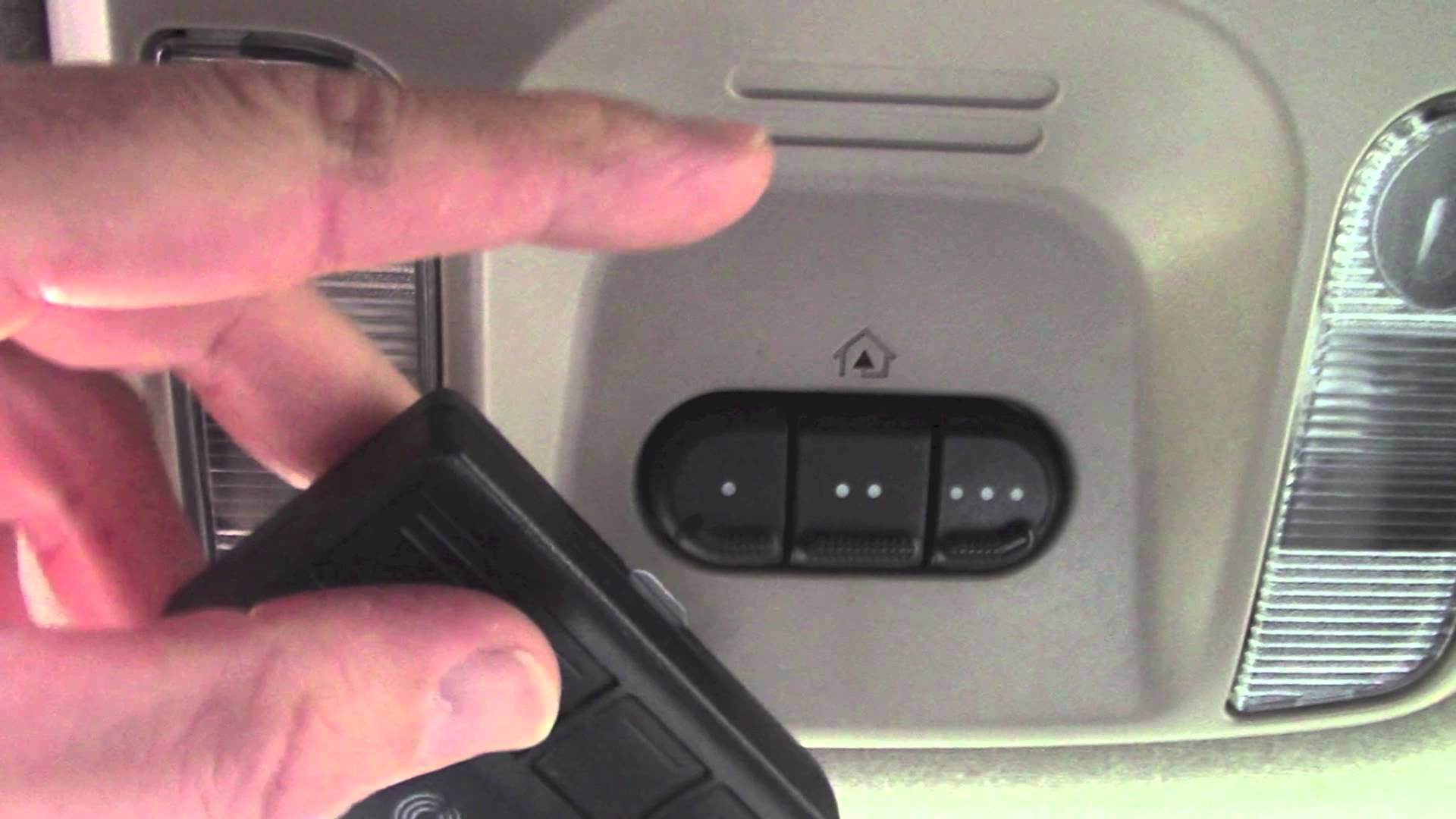
Sit in your Jeep with the ignition in the “Run” position. Don’t start the engine. Locate your HomeLink buttons on the sun visor or overhead console. Most Jeep models have three buttons arranged in a row.
If this is your first time programming or you want to clear old settings, press and hold the two outer buttons simultaneously until the indicator light blinks. Count to roughly 20 seconds. The light will transition from slow blinking to rapid blinking. This erases any previously programmed doors from the system.
Select which HomeLink button you want to use for your garage door. Grab your garage door remote and position it 3 to 8 inches directly below the HomeLink button. Press and hold both the HomeLink button and your remote button simultaneously.
Watch the HomeLink indicator light. It will blink slowly at first. Continue holding both buttons. After 10 to 30 seconds, the light should change to rapid flashing or solid illumination. This indicates the HomeLink system has learned your remote’s signal. Release both buttons.
Test this stage by pressing the HomeLink button while still inside your Jeep. The garage door should respond—either opening, closing, or cycling if it’s already partially open. If nothing happens, repeat this stage. Some remotes require a second or third attempt before the signal transfers completely.
Stage 2: Syncing HomeLink to Your Garage Door Opener (Rolling Code Only)
If your garage door opener has a “Learn” button, you’re using rolling code technology and must complete this second stage for full functionality.
Go to your garage and locate the learn button on your opener motor. It’s typically orange, yellow, purple, or red. Press and release the learn button once—don’t hold it. The motor should show a blinking light or indicator. You now have approximately 30 seconds to return to your Jeep.
Move quickly back to your vehicle. Press the HomeLink button you just programmed two times, holding it for roughly 2 seconds each press. Watch your garage door. It should cycle (open or close) as you press the HomeLink button. This cycling confirms that the garage door opener has accepted the HomeLink signal.
If the door doesn’t cycle, check that you pressed the HomeLink button within the 30-second window. Return to the garage, press the learn button again, and retry. Some systems require up to three attempts. Patience here saves frustration later.
Testing Your Setup
Once programming is complete, test the system thoroughly. Press the HomeLink button while sitting in your Jeep with the ignition on. The garage door should respond consistently. Try from different locations—closer to the garage, farther away—to verify reliable range.
If the button works inside your garage but fails outside, the issue is likely range. Check your garage door opener’s antenna. It should be straight and unobstructed. A bent or damaged antenna severely limits signal reception. Straighten any kinked sections carefully.
For multiple garage doors, repeat the process for each additional door using different HomeLink buttons. Test all buttons to confirm each one controls the correct door.
Common Problems and Solutions
HomeLink button doesn’t respond after programming. Verify that your vehicle’s ignition is in the “Run” position. Jeep’s HomeLink is disabled when the ignition is off. Turn the key to “Run,” press the button again, and test.
Slow blinking never changes to rapid blinking. This usually means the remote signal didn’t transfer. Check that you’re holding both buttons simultaneously, not one after the other. Also, verify your remote’s batteries aren’t weak. Replace batteries and retry. Some remotes require the buttons to be held for the full 30 seconds; be patient.
The garage door doesn’t cycle during rolling code setup. You may have missed the 30-second window. The learn button activates a short timer. Go back to the opener, press the learn button again, and immediately return to your Jeep. Having a second person at the garage opener speeds this process—one person manages the learn button while you handle the HomeLink button.
HomeLink learned the signal, but the garage door won’t open. This typically happens with rolling code openers when Stage 2 wasn’t completed properly. Return to the garage, press the learn button again, and repeat the HomeLink synchronization (pressing the button twice, 2 seconds each).
Limited range or intermittent operation. Check the antenna on your garage door opener. Debris, dents, or bends reduce signal strength. Also, check your remote’s batteries. Weak batteries during initial programming can permanently limit range until you reprogram with fresh batteries.
The very old garage door opener won’t respond. Extremely old fixed-code openers (pre-1990s models) sometimes lack compatibility with HomeLink. If the opener has no learn button and won’t respond after multiple attempts, you may need a new remote made specifically for that opener model, or consider upgrading to a modern rolling code opener.
Alternative Programming Methods
Without your original remote
Some situations prevent using the original remote—it’s lost, broken, or the previous owner didn’t provide it. You can still program HomeLink directly to your garage door opener.
Press and hold your HomeLink button for about 20 seconds until the indicator light blinks slowly. Continue holding. Go to your garage (if you can reach it) and press your garage door opener’s learn button. The light should start blinking. Return to your Jeep within 30 seconds and continue holding the HomeLink button. The light will eventually change to rapid flashing, indicating success.
This method works for most modern rolling code openers but requires quick movement between the garage and vehicle.
Gated community or commercial gates
Some properties use specialized access systems instead of standard garage doors. HomeLink can program these as well, but you may need access codes from your property manager or security company. The process is identical—press the access system’s programming button and sync it to HomeLink.
Jeep Model Specifics
Jeep Wrangler (JL and newer). HomeLink buttons are located on the sun visor. Ignition must be in “Run” position. Follow the standard two-stage process. Some owners report that holding the remote very close (2 to 3 inches) works better than the recommended 3 to 8 inches.
Jeep Grand Cherokee (WK2 and WL). HomeLink buttons are integrated into the overhead console. The process is identical to Wrangler models. Ensure the ignition is in “Run,” not “Accessory.”
Older Jeep models. If your Jeep predates HomeLink integration, you cannot add it without a complete overhead console replacement or aftermarket installation. Check your owner’s manual to confirm your vehicle includes this feature.
Final Tips for Success
Clear away any previous programming if you’ve used HomeLink with a different garage door. This prevents signal conflicts. Your Jeep can store up to three separate garage door or gate frequencies, so managing which buttons control what matters if you have multiple properties.
Test your setup multiple times on the same day. Occasionally, a successful program can fail after sitting unused for weeks. If it stops working suddenly, reprogram before contacting support—the system sometimes requires a refresh.
Keep your garage door remote in your vehicle during the programming process, even after setup is complete. Having it available makes reprogramming simple if needed, and it serves as a backup if HomeLink malfunctions.
Document which button controls which door if you’ve programmed multiple doors. A small label on your visor or a note in your vehicle’s manual prevents confusion later.