
How to Turn Off Interior Lights on a Jeep Gladiator: Complete Guide 2026

Your Jeep Gladiator’s interior lights can become a nuisance—whether you’re removing doors for off-roading, trying to save battery power, or simply prefer manual light control. The good news: turning them off is straightforward once you understand the control system. This guide walks you through every method.
credit: www.jeepgladiatorforum.com
Understanding Your Gladiator’s Interior Lighting System
Your Gladiator uses an integrated lighting control system managed by the Body Control Module (BCM). Unlike older Jeep models with simple on/off switches, modern Gladiators combine automatic and manual controls through dimmer switches positioned on the left side of your steering column.
The system includes several light zones: the central dome light, four reading lights mounted in the roll bar, footwell/floor lights, door handle ambient lighting, and truck bed lights (exclusive to Gladiators). Each responds differently to the two thumbwheel controls next to your headlight switch.
Understanding these controls prevents frustration and battery drain—a critical issue when you remove your doors.
The Dimmer Controls: Your Primary Tool for Light Management
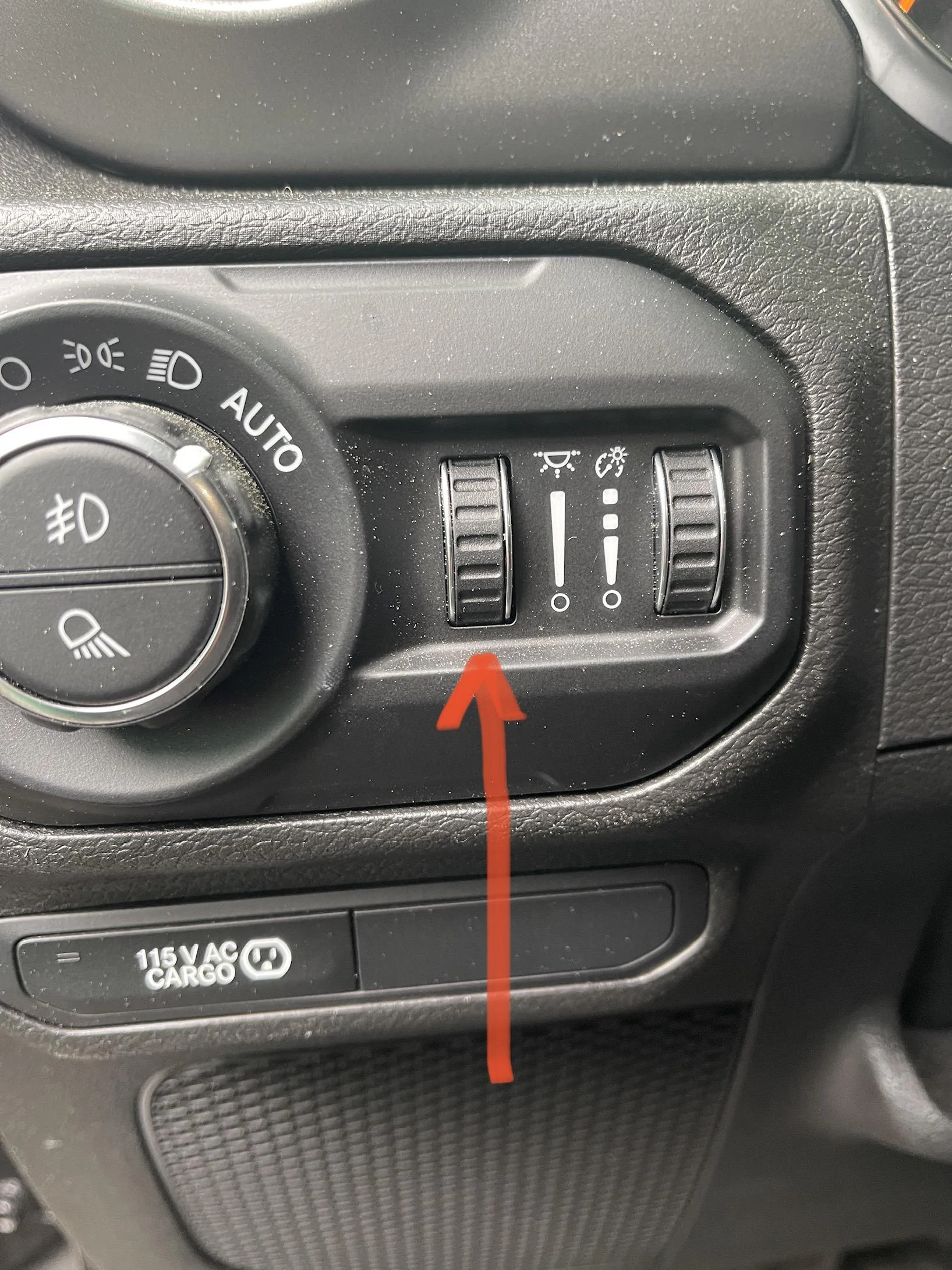
Two thumbwheels sit next to your headlight control knob on the left side of the instrument panel. Each controls a different aspect of your interior lighting.
The Left Thumbwheel adjusts the intensity of ambient and footwell lighting. This dial controls the door handle lights and floor lights below the instrument panel. Rotating it all the way down dims these lights significantly; rotating all the way up maximizes their brightness.
The Right Thumbwheel adjusts your instrument panel’s brightness. This is critical because your interior dome and cabin lights are tied to this control. Rotating it influences when and how brightly your dome light activates.
The interaction between these two controls confuses many Gladiator owners because adjusting one affects the behavior of the other. The manual often doesn’t clearly explain this relationship, which is why many owners resort to online forums for answers.
credit: www.caranddriver.com
Step-by-Step: Turning Off Interior Lights When Doors Open
Step 1: Locate the Dimmer Controls
From the driver’s seat, look at the left side of your instrument panel, next to the steering column. You’ll see your headlight control knob in the center, with two thumbwheel dials on either side. A speedometer symbol marks these controls for easy identification.
Step 2: Identify Which Dial Controls the Cabin Lights
The right thumbwheel (closest to the steering wheel) manages your instrument panel and dome light brightness. This is your primary control for stopping interior lights from activating when doors open.
Step 3: Rotate the Right Dial All the Way Down
Turn the right thumbwheel completely downward until it stops. You’ll feel a distinct resistance at the bottom position. At this setting, your interior lights will not illuminate when you open the doors, even if the ignition is on.
Important caveat: This position also dims your instrument panel to the lowest setting, which may reduce visibility of your dashboard at night. You’ll need to manually press the individual dome lights to turn them on when needed.
Step 4: Test the System
Open your driver’s door while the engine is running. Your interior lights should remain off. If they still activate, verify the dial is truly at the bottom position—even a slight rotation upward will re-enable door-triggered lighting.
Manual Light Controls: Direct Dome and Reading Light Operation
If you want independent control over individual lights rather than using the dimmer switches, your Gladiator offers manual operation.
For Reading Lights
The four reading lights mounted in your roll bar can be activated individually. Simply press the lens of the light you want to use. Press again to turn it off. This method bypasses the dimmer settings entirely.
For the Center Dome Light
This light operates through the instrument panel dimmer (right thumbwheel). Unlike the reading lights, you cannot press the dome lens to control it—the dimmer settings determine its behavior. When the right dial sits in the middle position, the dome light activates when you open doors and automatically turns off after approximately 10 minutes once you close them and turn the ignition off.
This automatic timeout feature is part of Jeep’s battery-saver technology, designed to prevent overnight battery drain if you accidentally leave a door slightly ajar.
Troubleshooting: Why Your Interior Lights Won’t Turn Off
Problem: Lights Stay On Even with the Dimmer All the Way Down
Check that all doors are completely closed. A slightly ajar door—even one you don’t notice—will override your dimmer settings if the system detects an open circuit. Inspect the door jambs for mud, ice, or debris that might prevent doors from sealing fully.
If all doors close properly and lights still remain on, your door sensor may be faulty. Modern Gladiators use magnetic switches in each door jamb to detect when doors open. A malfunctioning sensor sends constant “door open” signals to the BCM, bypassing dimmer controls.
Problem: Lights Flicker or Cycle On and Off
Flickering typically indicates the dimmer dial is positioned in a sensitive middle zone. The BCM interprets this as an ambiguous state and cycles the lights. Move the dial decisively either all the way down or click it up one position to find the stable setting where the lights either stay off or remain on without flickering.
Problem: Footwell Lights Won’t Turn Off
The left and right thumbwheels interact in unexpected ways. If your footwell lights stay on at night, try turning the right dial (instrument panel brightness) down slightly. Some owners report that maximizing dashboard brightness prevents the footwell dimmer from functioning. Adjust both dials in sequence until you find the combination that turns the footwell lights off.
Gladiator-Specific Control: Truck Bed Lights
Unlike the Wrangler, your Gladiator includes dedicated truck bed lights controlled through the headlight switch assembly. The bottom half of the light control button activates the bed lights. Press it once to turn them on, press again to turn them off.
A small indicator light appears on your instrument panel when bed lights are active, letting you know their status. This is useful because you cannot see the bed lights from the driver’s seat. If you want to turn off all interior lighting—cabin and bed combined—ensure both the dimmer controls are down and the bed light button is in the off position.
The Automatic Battery Saver Feature: How It Works
If your ignition is off and you leave a door open, your Gladiator automatically disables interior lights after approximately 10 minutes. This feature exists specifically to prevent battery drain in situations where owners forget a door was ajar.
The BCM monitors ignition status and timer counts. Once the timer expires, the BCM cuts power to interior light circuits even if a door remains open. When you turn the ignition back on, the feature resets, and the lights respond normally to door activity.
This feature is a lifesaver during door removal for off-roading. Leave the ignition off, remove your doors, and the lights will disable automatically within 10 minutes. However, if you keep the ignition on while doors are removed, this protection doesn’t apply, and your battery will drain if the dimmer is set to activate lights on door events.
Removing Doors Without Battery Drain: The Proper Method
Many Gladiator owners customize their vehicles by removing doors for trail use. The challenge: with doors off, the BCM thinks a door is always open, triggering interior lights continuously and draining your battery in hours.
Recommended Method: Turn Off the Ignition
The simplest approach leverages the battery saver feature. Remove your doors with the ignition off and keys removed from the vehicle. Within 10 minutes, the BCM will automatically disable interior lights. Your battery won’t drain even with doors off.
If you need to test systems with the ignition on, rotate the right dimmer dial all the way down first. This prevents lights from activating when the system detects open doors.
Alternative Method: Tape the Door Sensors
Older Jeep models allowed fuse removal to defeat door sensors. Gladiators use BCM-controlled logic, making fuse removal insufficient. However, you can tape the magnetic door sensors found in each door jamb. This makes the BCM believe all doors are closed.
Locate the sensor—a small cylindrical component in the door jamb area. Cover it completely with electrical tape, ensuring no gap exists that might break the magnetic connection. When taped, the sensor won’t register the open door state. Remember to remove tape and reset sensors when you reinstall doors, or you’ll disable the safety feature permanently.
This method requires knowledge of your vehicle’s specific sensor locations. Consult your Gladiator’s technical manual or forum-specific guides before attempting tape application.
When to Seek Dealer Service
If your interior lights won’t turn off despite following every step in this guide, or if they flicker uncontrollably, you likely have a faulty door sensor or a BCM programming issue. These problems require dealer-level diagnostics.
Symptoms that indicate dealer service: lights stay on with all doors closed and dimmer controls at minimum, lights that won’t respond to any dimmer position, or lights that drain your battery overnight without visible causes.
Many Gladiator owners have reported BCM software glitches affecting interior lighting behavior. A dealership can reprogram the module or replace faulty sensors under warranty if your vehicle qualifies.
Key Takeaways
Turning off your Jeep Gladiator’s interior lights involves understanding two critical controls: the right thumbwheel (instrument panel dimmer) for dome and cabin lights, and the left thumbwheel (ambient dimmer) for footwell and door handle lights. Position the right dial all the way down to prevent lights from activating when you open doors. For truck bed lights, use the dedicated button on the light control switch.
The battery saver feature automatically disables lights 10 minutes after the ignition turns off, making door removal straightforward if you simply turn the key off. For persistent problems, faulty door sensors or BCM issues require professional diagnosis.
Your Gladiator’s lighting system is more sophisticated than older Jeeps, but once you understand the control hierarchy, managing interior lights becomes intuitive. Use this guide as your reference whenever light behavior confuses you.