How to Fix 2019 Jeep Compass Screen Not Working (Black/Uconnect Reset)

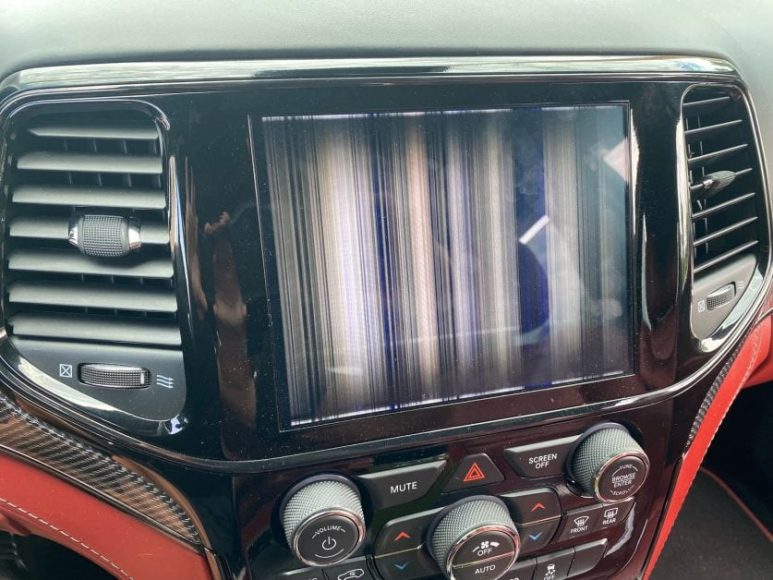
Your 2019 Jeep Compass infotainment screen going black or becoming unresponsive can be incredibly frustrating, especially when you rely on it for navigation, backup camera, and climate controls. This guide walks you through proven troubleshooting steps from simple soft resets to advanced hardware fixes that have helped thousands of Compass owners restore their Uconnect systems.
Common Symptoms and Causes
Most 2019 Jeep Compass owners report similar screen failures: complete blackouts except when reversing, flickering displays with distorted colors, or touchscreens that respond intermittently. The backup camera may work while other functions remain frozen, indicating software glitches rather than total hardware failure.
Heat damage tops the list of culprits. The 2019 model’s infotainment unit sits directly behind the dashboard, where summer temperatures can exceed 140°F (60°C). This sustained heat causes internal solder joints to crack and screen delamination—visible as bubbling or peeling at display edges.
Electrical issues also trigger malfunctions. The F02 fuse behind the driver’s control panel frequently blows due to voltage spikes during jump-starts or battery replacements. Loose ribbon cables connecting the screen to the main board create intermittent failures that worsen over bumpy roads. Finally, corrupted software from interrupted updates can freeze the system entirely.
The 2019 Compass shares this vulnerability with 2018-2021 models. Online forums document hundreds of cases where temperature extremes or faulty driver boards cause identical symptoms. Stellantis hasn’t issued a recall, but NHTSA complaint S2108000130 acknowledges widespread delamination problems.
Quick Soft Resets
Start with a soft reset—this fixes 60% of screen issues without tools. With your engine off and doors closed, press and hold both the Power button and Volume Up button simultaneously for 10-15 seconds. The screen should go dark, then display the Uconnect splash logo. Release the buttons once the system reboots.
If the first method fails, try the alternate button combination. Turn the ignition to accessory mode (don’t start the engine). Press and hold the Phone button and Voice Command button together for 12 seconds until the screen resets. This clears temporary software glitches stored in volatile memory.
A cold reboot often works when other methods don’t. Turn off the engine, open the driver’s door, and wait 2 full minutes with the door ajar. This forces the body control module to fully power down, clearing residual electrical charges. Restart the vehicle and check if the screen initializes properly.
Remove all USB devices and unplug phone cables before attempting resets. Faulty accessories can create data conflicts that prevent successful reboots. Check that no CDs or SD cards are stuck in media slots—these physical obstructions sometimes trigger error states.
Battery and Fuse Checks
A hard battery disconnect resets the entire electrical system when soft methods fail. Turn off the engine and locate your battery under the hood. Use a 10mm wrench to loosen the negative terminal clamp (marked with a minus sign). Remove the negative cable and wait 5-10 minutes—this drains capacitors and fully resets all modules, including Uconnect.
While the battery is disconnected, inspect both terminals for corrosion. White or green buildup prevents proper electrical flow. Clean terminals with a wire brush and baking soda solution, then reconnect the negative cable tightly. Loose connections cause voltage drops that corrupt infotainment software.
The F02 fuse protects the Uconnect circuit. It’s located in the fuse panel behind the steering wheel—you’ll need to remove the plastic cover by pulling the tab on the left side. Use the fuse diagram on the panel lid to locate F02 (usually position 12 in the 2019 model). Remove it with needle-nose pliers and check the metal strip inside for breaks.
Replace blown fuses with exact amp-rated replacements from auto parts stores. Installing higher-amperage fuses risks electrical fires. If the new fuse blows immediately, you have a short circuit requiring professional diagnosis. Persistent fuse failures often point to faulty wiring behind the dashboard.
After reconnecting everything, check for software updates through Uconnect settings if your screen powers on. Navigate to Settings > System Info > Software Update. Updates patch known bugs that cause freezing. You’ll need a stable Wi-Fi connection or visit a dealer with the latest firmware on USB drives.
Advanced Hardware Fixes
When resets fail, hardware repair becomes necessary. The most common fix involves reseating the ribbon cable connecting the display to the driver board. This requires removing the center console bezel—pry gently with plastic trim tools to avoid breaking clips. YouTube tutorials like “DIY: 2018-2021 Jeep Compass Delaminated Screen Replacement” show the exact disassembly process.
Once the screen unit is accessible, locate the flat ribbon cable at the back. Disconnect it by flipping up the small locking tab, then carefully reseat it, ensuring full contact. Oxidation on connector pins prevents signal transmission—clean contacts with isopropyl alcohol on a cotton swab before reconnecting.
Screen replacement costs around $150-200 for aftermarket units from suppliers like AliExpress or Amazon. OEM Uconnect screens run $400-600 but offer better compatibility. The installation takes 1-2 hours with basic hand tools: T15 Torx screwdriver, plastic pry tools, and 10mm socket wrench. No programming is required for plug-and-play aftermarket screens.
Delamination damage requires full screen replacement. You’ll recognize this by bubbles under the glass or LCD panels separating from the digitizer. No amount of software fixes can repair physical screen deterioration caused by heat exposure.
Driver board failures present the worst-case scenario. Symptoms include screens that power on but display garbled graphics or emit no backlight. Dealers charge $500-800 for driver board replacement with diagnostic fees. Independent shops offer repairs for $300-400.
Check if your vehicle qualifies for goodwill assistance. Some Stellantis dealerships have offered free or discounted repairs for 2019 Compass owners with documented screen failures under extended warranty programs. Bring service records showing the issue started during original warranty coverage.
Prevention and When to Seek Professional Help
Prevent future failures by managing heat exposure. Use windshield sunshades when parking outdoors in summer heat. Dashboard temperatures drop 25-35°F with proper shading, extending electronics’ lifespan significantly.
Install the latest Uconnect software updates every 6 months. Stellantis releases patches addressing stability issues and heat management. Enable automatic updates in Settings if your model supports over-the-air functionality.
Inspect the F02 fuse every oil change. Replace it preemptively if you notice any discoloration or if the metal strip looks thin. Fuse failures often provide early warning before major electrical problems develop.
Recognize when DIY attempts won’t work. If your screen shows physical cracks, emits smoke, or fails after battery disconnect, stop troubleshooting immediately. Continuing could damage other electrical components, costing thousands in repairs.
Seek professional diagnostics for recurring issues. Persistent problems after trying all reset methods indicate deeper wiring faults or module corruption requiring dealer-level scan tools. These tools access hidden error codes that generic OBD2 scanners miss.
Consider OBD2 scanners with Uconnect-specific functions. Tools like the BlueDriver or Autel AutoLink read body control module codes that pinpoint whether fuse issues, software corruption, or hardware failures cause your screen problems. These cost $80-150 but save hundreds in unnecessary dealer visits.
Frequently Asked Questions
Is there a recall for the 2019 Jeep Compass screen issues?
No official recall exists, but NHTSA document S2108000130 acknowledges delamination complaints. Contact Stellantis customer care with your VIN to check for service bulletins or goodwill repair eligibility. Some owners have received free fixes by escalating through corporate channels.
How much does screen repair cost?
DIY screen replacement costs $150-200 for aftermarket parts plus 2 hours of labor. Dealer repairs range from $500 (screen only) to $1,200 (driver board replacement). Independent electronics specialists offer middle-ground pricing at $300-400 with warranties.
Will disconnecting the battery erase my radio presets?
Yes, battery disconnects reset all electronics, including radio stations, clock, and seat positions. Write down presets before attempting this fix. Your navigation favorites and phone pairings may also need reconfiguration.
Can I drive safely with a non-working screen?
Yes, for basic driving, but you lose critical functions. The backup camera won’t display, climate controls become manual-only, and navigation disappears. Check that physical HVAC controls still work before deciding whether the vehicle remains safe for your needs.
Does this problem affect other Compass model years?
Yes, 2018-2021 Compass models share identical Uconnect hardware with similar failure rates. The 2022+ redesign uses different components with improved heat shielding. Used buyers should avoid 2018-2019 models unless screen functionality is verified or factored into pricing negotiations.