Mini Cooper Sat Nav Upgrade: How to Update Maps or Replace the Head Unit

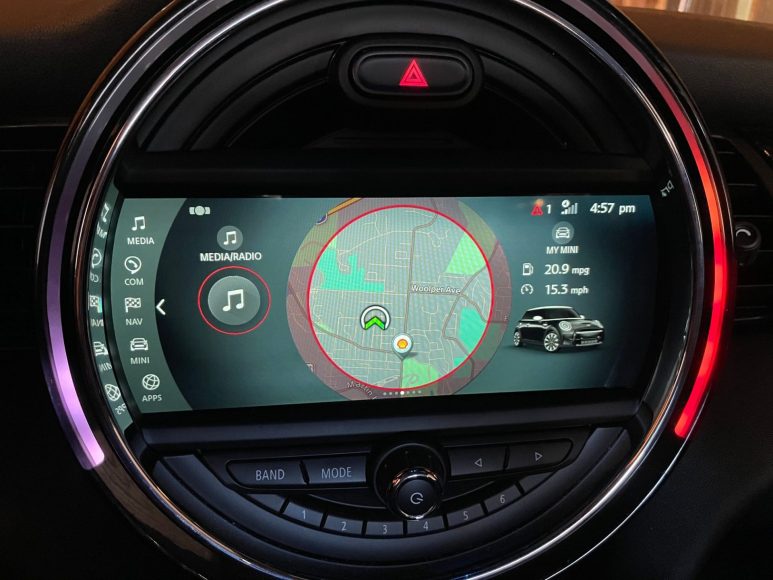
Can You Upgrade a Mini Cooper Sat Nav?
You can upgrade your Mini Cooper navigation system through software updates or hardware replacements. Many owners mistakenly believe they are stuck with the factory technology. In reality, you have three primary paths to modernize your driving experience.
First, you can perform a simple map-only update using a USB drive. This keeps the original interface but refreshes road data and points of interest. Second, you can retrofit Mini Connected software for better smartphone integration. Third, you can install a full aftermarket head unit to add modern features like wireless Android Auto.
Compatibility depends largely on your Mini generation. R56 models (2007–2013) typically require hardware swaps for modern features. F56 models (2014–present) often support software-based retrofits or NBT head unit upgrades. Identifying your current system is the first step toward a successful installation.
OEM Mini Cooper Sat Nav Upgrade: USB Map Updates
The most common upgrade is a factory map refresh via the official MINI portal. This process updates the local road database without changing the car’s hardware. You generally need a high-speed 32GB or 64GB USB drive formatted to FAT32 or NTFS.
Step-by-Step Map Installation
The update starts by logging into your MINI account and selecting your specific vehicle. You download the map manager software, which transfers the latest region files to your USB drive. Once the data is ready, you insert the drive into the car’s USB port, usually located in the center console.
The car will recognize the update and prompt you for an FSC activation code. This 20-digit alphanumeric code is unique to your VIN and prevents software piracy. After entering the code, the installation takes 30 to 60 minutes. You can continue driving during the process, provided you do not turn off the ignition.
Fixing Common Map Update Errors
If your Mini does not recognize the USB drive, verify the file structure. The data must be in the root directory rather than hidden inside a folder. Use a high-quality brand-name drive, as cheaper generic sticks often fail during the long data transfer.
“No Map Update Found” errors usually stem from region mismatches. Ensure the downloaded map matches the original region of your vehicle’s navigation system. If the FSC code is rejected, double-check that it was generated specifically for your current map version.
Retrofitting Mini Connected and Newer Infotainment
Retrofitting allows older vehicles to run newer Mini software. This is ideal for owners who want a factory look but need modern functionality. Most Minis built after 2011 with the Visual Boost radio can support some level of software enhancement.
Benefits of System Retrofitting
A successful retrofit grants access to real-time traffic information and remote vehicle services. You gain a polished user interface that feels faster and more responsive than the original system. Newer versions also offer improved voice recognition and better Bluetooth stability for audio streaming.
Retrofitting often requires a “bridge” device or specific coding to bypass factory restrictions. Professional installers use tools like E-Sys or BimmerCode to tell the car’s computer that new hardware is present. This ensures that steering wheel controls and vehicle status menus continue to function correctly.
Typical Cost Considerations
OEM retrofits are generally more expensive than third-party solutions. A professional installation can range from £400 to over £1,000 depending on the hardware required. While costly, this path preserves the car’s resale value by maintaining a genuine factory appearance.
Aftermarket Android Auto and CarPlay Head Unit Upgrades
Aftermarket head units are the most powerful upgrade option. These systems replace the entire central speedometer housing or the internal screen assembly. They are designed to bring 2026-level technology to older vehicle cabins.
| Feature | OEM Map Update | Aftermarket Head Unit |
|---|---|---|
| Primary Navigation | Factory Maps | Google Maps / Waze |
| Smartphone Link | Limited / None | Wireless CarPlay / Android Auto |
| Installation | Software Only | Hardware Replacement |
| Screen Quality | Original | High-Definition Touchscreen |
| Cost | Low (£50–£100) | Moderate (£300–£600) |
Aftermarket units often feature 9-inch or 10-inch touchscreens that significantly improve visibility. They support apps directly from your phone, meaning your maps are always current without paying for annual updates. Most kits include a plug-and-play wiring harness to simplify the installation process.
OEM vs Aftermarket Upgrades: Which Should You Choose?
Your choice depends on your technical comfort and budget. If you simply want accurate directions, a USB map update is the most logical and affordable path. It keeps the car 100% original and is the safest choice for vehicles under factory warranty.
Tech-focused drivers should prioritize aftermarket head units. The ability to use Waze or Spotify directly on the dashboard transforms the daily commute. These units provide a level of fluidity that older Mini systems cannot match, even with software updates.
| User Type | Recommended Path | Key Reason |
|---|---|---|
| Budget Conscious | USB Map Update | Lowest cost and zero installation risk. |
| Tech Enthusiast | Aftermarket Unit | Best features and modern app support. |
| Resale Focused | Mini Connected Retrofit | Modernizes the car while staying “Genuine.” |
Step-by-Step: Replacing the Mini Cooper Head Unit
Replacing a head unit is a demanding DIY task that requires patience. You will need a set of Torx drivers, plastic trim removal tools, and a microfiber cloth to protect the dash. Always disconnect the car battery before starting to prevent electrical shorts.
Removing the Factory Unit
Begin by prying off the plastic trim surrounding the central speedometer or screen. Several Torx screws hold the main unit in place; remove these and carefully pull the assembly forward. You must disconnect the large Quadlock connector and the various antenna cables from the rear.
Installing the New Hardware
Connect the new wiring harness between the car’s factory plug and the new head unit. You will need to route a new GPS antenna to the top of the dashboard or behind the A-pillar for a clear signal. If your kit includes a microphone for hands-free calling, run the wire along the headliner to the rearview mirror.
Before snapping the trim back into place, perform a full functional test. Check the FM/DAB radio, GPS signal strength, and steering wheel button responses. Ensure the reverse camera triggers correctly if you installed one as part of the kit.
Troubleshooting Mini Cooper Sat Nav Upgrade Issues
Upgrades rarely go perfectly on the first attempt. If you see a blank screen after a hardware swap, check the CAN-bus decoder box. This small plastic module allows the new radio to communicate with the Mini’s computer; if it is loose, the screen will not power on.
GPS signal issues usually stem from poor antenna placement. Metal inhibits signals, so the antenna must sit under plastic or glass. If your map position is drifting, move the antenna closer to the base of the windshield.
For map updates, a common failure is the “Wrong Map Version” error. This happens if you try to load “Move” or “Route” maps onto an “EVO” or “Next” system. Use your car’s navigation settings menu to check the current version name before purchasing an update.
Frequently Asked Questions
Can I add navigation to a Mini with a base radio?
Yes, but you must replace the entire center console display. Base-radio Minis lack the internal GPS hardware and the high-resolution screen required for navigation. Aftermarket kits are the most cost-effective way to add this feature to a base model.
Do Mini map updates cost money?
Official map updates usually require a paid license for the FSC code. Some newer Minis include a three-year subscription from the factory, but older models require a per-update purchase. Third-party sellers often provide these codes at a lower price than main dealerships.
Will an aftermarket head unit void my warranty?
An aftermarket unit may void the warranty on your electrical system if it causes a fault. However, under most consumer laws, it cannot void the warranty on unrelated mechanical parts like the engine or suspension. Always keep your original head unit so you can reinstall it before visiting the dealer for service.